Cafés and restaurants
One stand per table: guests scan the menu without waiting for a waiter.
A sturdy QR code stand for tables and counters: your digital menu, Google reviews, Instagram or Wi-Fi, with your business name in relief. Free 3MF or STL, or we print it for you.
The same design as an image, for menus, posters, websites or social media.
Want it as a keychain, stand or sign?
Everything is created in your browser: your link, your logo and your files are never uploaded to any server.
Your online menu, the Google review link, Instagram, WhatsApp or the Wi-Fi network.
Pick colors that match your place and add a short text like "Our menu" or "Leave us a review!".
The code plate prints flat for the cleanest result and slots into the stand. No supports needed.
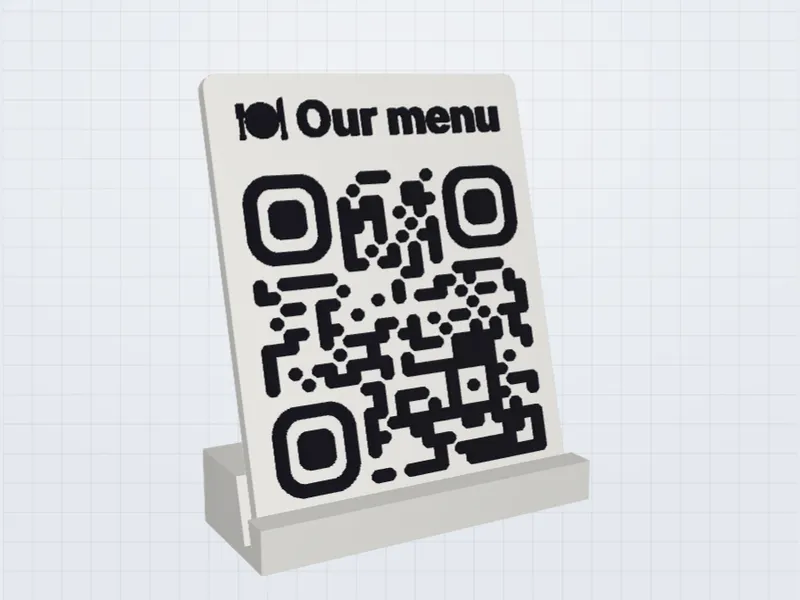
One stand per table: guests scan the menu without waiting for a waiter.
Next to the register, right after payment, when customers are happy.
Your Instagram or online store at the checkout.
Breakfast menu, guest guide or Wi-Fi on the bedside table.
Your logo in full color, a special shape, a bigger sign, 50 keychains for your event or a stand for every table. Tell us your idea and we'll design and print it with you.
A code of 5–6 cm scans comfortably from any seat at a restaurant table.
The code is static. If you update your menu at the same address, you never need to reprint.
Google's policies don't allow rewards in exchange for reviews. Ask every customer for honest feedback.
A 3D printed stand doesn't bend, survives spilled drinks and looks like part of your decor.
A table stand is the most common way to put a QR code in front of customers, and the details decide whether people scan it or ignore it. This guide covers the choices that matter most: size, angle, surface, material and how to roll the stands out across a whole venue.
Phone cameras read a code reliably when the distance is no more than about ten times its width. A guest holding a phone 40 to 60 cm from the table needs a code of 4 to 6 cm; a stand on a bar counter that people read from a metre away should be closer to 10 cm. If the stand also carries a short line of text above the code, make the base wider rather than shrinking the code: the code is the part that has to work.
A stand that leans back by roughly 10 to 20 degrees is easier to scan from a seated position than a vertical sign, and it throws overhead reflections away from the camera instead of into it. Matte filament works better than glossy in spotlit rooms, because a glossy surface can bounce a bright spot straight across the code. If your venue has a strong spotlight over each table, place one stand during the test and look at it from a seat before printing the rest.
Two-colour printing gives you a real raised code that is also easy to read. A dark code on a light base is the safest pairing: black on white, dark blue on cream or dark green on white all scan well. Avoid pairs of similar brightness, such as red on orange or yellow on white, even if they look good in the preview. Some scanners fail on inverted codes (a light code on a dark base), so test those with more than one phone before you commit.
A light stand falls over when someone leans on the table or puts a menu next to it. A wider foot, a thicker base and 20 to 30 percent infill all help. The table stand is made of two parts, the plate and the foot: check how they fit together on the first print and, if you want the stand permanent, glue them with an adhesive that suits your plastic so the plate cannot slip out.
The code stores a web address, so you can give each table its own by adding a parameter at the end of your ordering page, for example ?table=7. Your page can then show which table is ordering. Generate one code per table, print them in a batch and number the stands on the underside.
Print a single stand first. Scan it with at least two different phones, an iPhone and an Android, in the room's real light and from the seat, not from the printer. Check that the page behind the code opens quickly on mobile data, because a code that scans but leads to a slow page still loses customers. When it passes, print the rest in one batch so that colours and sizes match.
Because the code is static, you only reprint when the address changes. That is why it pays to point the code at a page you control, rather than directly at a file on a sharing service. You can then change what is behind the same address as often as you like.
Yes. You can design it and download the 3MF or STL for free. You only pay if you order printed stands.
The code always opens the same link. Keep the menu at the same address and the stand keeps working.
Yes, in the center of the code as a raised silhouette. For full-color logos, ask us for a custom design.
Yes. Keychain ₪25, wall sign ₪49 and table stand ₪59 (Israeli shekels), with lower unit prices from 3 or 5 units. We ship across Israel and abroad: we quote international shipping when we confirm your order.
Turn any link into a 3D printable QR code: two-color 3MF or STL.
A keychain with your QR code in relief, ready to 3D print.
Guests scan and join your Wi-Fi without typing the password.
Instagram, WhatsApp, Google reviews and more ideas in the main generator.
Last updated: September 30, 2026
This policy explains how FreeQRCode3D (“we”, “the site”) handles information when you use this QR code generator. The site is run by Elías, based in Tel Aviv, Israel. Contact: woldmanelias@gmail.com.
Nothing that you type or upload. Your links, Wi-Fi names and passwords, phone numbers, logos, and the PNG, SVG, 3MF and STL files are created entirely inside your browser. They are never sent to us or stored on any server. When you close the page, they are gone.
We have no accounts, sign-up forms or newsletters.
If you order a printed piece, you send us a message with your name, email address, city, the design (including the content of the QR code) and any notes. We use this only to confirm, make and ship your order and to reply to you; your postal address is requested when we confirm. We keep order emails as long as needed for the order and for legal and accounting obligations, and never sell or share them, except with the payment provider and the postal service needed to deliver your order.
Like any website, the service that hosts this page may keep standard technical logs (such as IP address, browser type and the time of the visit) to deliver and protect it. Fonts are loaded from Google Fonts, which receives your IP address to send them. Neither service receives the content you create in the tool.
This site may show ads from third parties such as Google AdSense. Third-party vendors, including Google, use cookies to serve ads based on your previous visits to this and other websites. Google's use of advertising cookies enables it and its partners to serve ads based on your visits to this site and/or other sites on the Internet. You can opt out of personalized advertising in Google Ads Settings or at aboutads.info. Learn more in how Google uses information from sites that use its services. Where the law requires it, we ask for your consent before any advertising cookies are set.
This site is not directed at children under 13 and we do not knowingly collect information from them.
Because we don't store personal data from the tool, there is usually nothing for us to access, correct or delete. For data held by advertising partners, use the opt-out links above or contact those companies directly. Depending on where you live (for example, under the EU GDPR or Israel's Privacy Protection Law), you may have additional rights, which we will respect. For any privacy question or request, write to woldmanelias@gmail.com.
If this policy changes, we'll update the date at the top of this page.
Last updated: September 30, 2026
FreeQRCode3D is a free online tool run by Elías, based in Tel Aviv, Israel. Contact: woldmanelias@gmail.com or WhatsApp +972 55 247 8806. By using the site you agree to these terms.
You can use FreeQRCode3D free of charge, for personal or commercial projects, to create QR codes and 3D printable files. Everything you create is yours, and you're responsible for the links and content you put in your codes. Don't use the tool to link to illegal, harmful or deceptive content.
The tool is provided “as is”. We work to make every code scannable and every file printable, but results depend on your printer, material, settings and the phone that scans it. Always test-scan your code before printing in quantity or distributing it. To the extent permitted by law, we are not liable for any loss arising from using the site or the files it produces.
When you send an order request, we reply to confirm the price, shipping and delivery estimate and send a secure payment link. The order is final only after you pay. Prices are in Israeli new shekels (₪). For shipments outside Israel, shipping is quoted separately and any import taxes or duties are paid by the buyer. Because every piece is made to order, we don't accept returns for change of mind; if a piece arrives damaged or the code doesn't scan because of a printing defect, we'll reprint it or refund you. You're responsible for checking the content of your QR code (link, Wi-Fi details, spelling of the text) before ordering.
We don't control the websites your QR codes point to, or the ads shown by advertising partners, and we're not responsible for their content.
QR Code is a registered trademark of DENSO WAVE INCORPORATED. Bambu Studio, OrcaSlicer, PrusaSlicer, Google, Instagram and WhatsApp are trademarks of their respective owners and are mentioned for reference only; this site is not affiliated with them.
These terms are governed by the laws of the State of Israel, without prejudice to any mandatory consumer rights you have where you live.
Last updated: September 30, 2026
Cookies are small files that websites store in your browser.
FreeQRCode3D doesn't set any tracking cookies of its own. It only uses your browser's session storage to remember that you closed the small corner ad, and that is erased when you close the tab.
When ads are enabled, advertising partners such as Google may set cookies to show and measure ads, including personalized ads based on your visits to other sites. Where the law requires it, a consent banner will ask for your permission first, and you can change your choice at any time.
You can block or delete cookies in your browser settings and opt out of personalized ads in Google Ads Settings. The QR code tool keeps working without cookies.
Questions about cookies: woldmanelias@gmail.com.
WhatsApp